
Korneff Tips 11: Training Your Ears and Finding Clarity
This is more of an exercise than a tip. It will train your ears a bit, give you insight into the frequency response of individual instruments, and show you a simple and effective way of getting more sonic clarity in a mix.
So, you have something you’re mixing, you’re unfamiliar with the track. The first thing I do is a bunch of Diagnostic Passes. It is what it sounds like, it’s taking a swing at the mix specifically to find out what needs to be fixed before things get sweetened.
Make the Mix Make Sense
Without using any processing, group your channels out, if you do that sort of thing, and then get a fader up a mix where it is basically balanced. Get all the tracks in there if you can. Find an arrangement of faders and pans that makes sense.
There was a time in the life of the recording when people listened to it as a rough mix, while they were tracking things, and thought it sounded good. The groove was there, the vocals sat pretty well, maybe a little too loud or a little too quiet, but it was intelligible. The mix didn’t have a lot of processing, but the faders could be placed in such a way that you could get a decent rough mix—it made sense. The better the engineering, the less work required to make it make sense. So before you dig into changing the way things sound, get a mix that makes sense.
Find the Dumb Humpies
What the hell is a Dumb Humpy?
I made this word up to describe something I run into all the time. A dumb humpy is an accumulation of energy in a frequency area that is adding a bunch of mud or harshness or a general lack of clarity to the mix. It’s a buildup of sonic gook. There’s always three, sometimes five or six. Dumb humpies are the result of frequency ranges of the various tracks building up and combining into, well, a dumb humpy. Experienced engineers hear this easily, and I am sure they call it something more mature than a dumb humpy. Whatever. Let’s find and kill dumb humpies, shall we?
Put an instance of the Amplified Instrument Processor on your stereo bus. Grab the demo if you don’t own one. You can also use a DAW channel EQ, but I prefer the AIP for reasons that will become apparent.
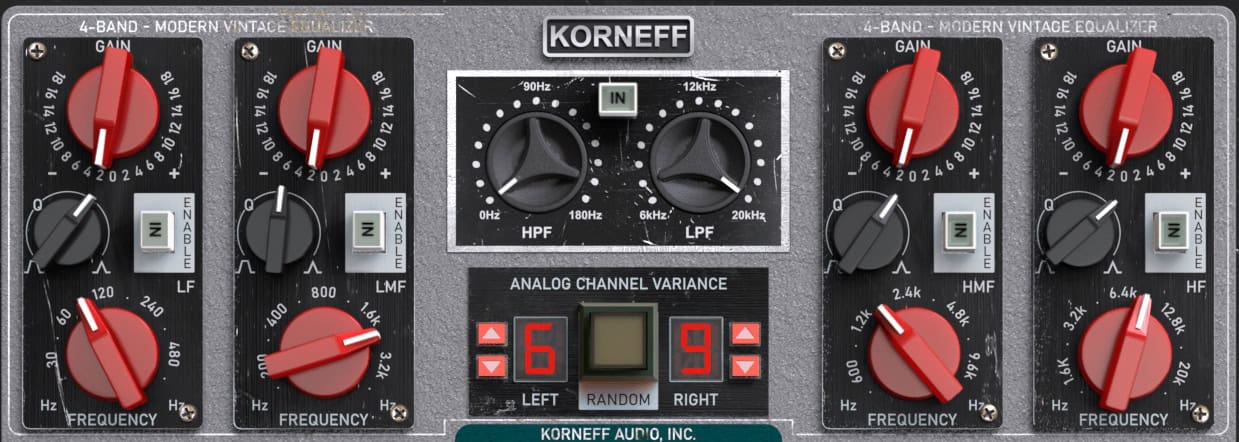
The AIP has got a four band parametric. We’ll find a dumb humpy for each band.
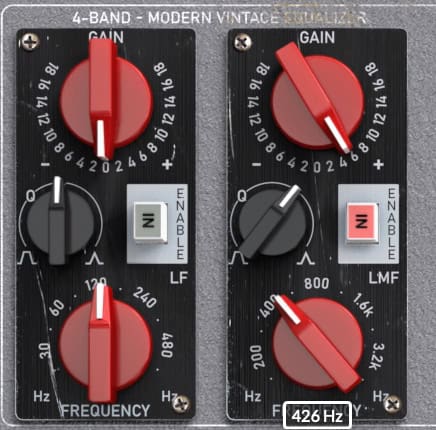
Grab the LMF (Low Mid Frequency) band first—it’s the second from the left. Press IN, set the Q to around 2, give it maybe 6dB of gain, and start sweeping… and LISTEN.
What you’re listening for is a kind of cardboard tube honky kind of sound. Shape your mouth like you’re breathing warm air on to your cold hand and say “OOOOOOO” at the same time. You’re listening for something that sounds like that. It is steady state. It doesn’t seem to shift when the chords change. It ignores the dynamics of the song and just sits there. Usually, it is VERY obvious when you find one. It seems weirdly loud. Sweep around 'til you find one.
Here’s the first one I’ve found at 426Hz. You probably heard a few, pick the loudest one. Bypass the band on the AIP's EQ and listen. A/B it a bit. The humpy will be really noticeable on the A/B.
A dumb humpy is an accumulation of frequencies, but usually it’s mainly the fault of one or two instruments. Can you figure out which one by listening? This next trick will help.
Kill the Dumb Humpy
Grab the gain for the band and set it to -2dB. That’s it: a tiny little cut. Again, press the IN for the band and compare the in and out. Here is the bizarre thing: the instrument causing the issue will usually sound louder. You might hear two instruments get louder, but that little 2dB cut will make a big difference.
Try cutting even less and maybe increasing the bandwidth a bit. Listen listen listen! Usually I can get it to about a single dB of cut with a slightly wider bandwidth and it has a profound effect.
Which instrument is it most affecting?
This is where it gets kinda cool. Drag a COPY of the AIP over to the offending instrument’s channel. Go back to the AIP on the Stereo Bus and switch off the band. Play the mix. You’re now doing like a 1dB cut on one instrument. Is it clearer and cleaner sounding? Is that instrument jumping out a bit? Does it seem louder? Compare the EQ in and out.
You wouldn’t think a tiny cut would make such a difference, but it does.
Find and Kill more Humpies
Go back to the AIP on the Stereo Bus. You can use another band, or the same one, and go looking for another dumb humpy. Set the Q to 2, the gain to around 5 or 6. Always go back to those settings.
Find them, do the little cut, listen for who gets louder, copy the AIP over to the channel, bypass the Stereo Bus AIP and fine-tune the AIP on the channel. If you are finding that multiple humps are caused by one instrument, simply switch another band to ON and dial in the setting.
Humps below 200Hz might present more as rumble. Humps above 2kHz might sound more like someone shushing you. SHHH!
High mids and high humps are often caused by vocals mixing with guitars and by cymbal crashes on the overheads. When it’s on a cymbal, when you put in the cut, the cymbal will typically seem to decay faster, not get less bright. The cut seems to make the cymbals die out faster.
Try to find and kill four, one for each band of the AIP.
Listen to your mix. You might find you have to readjust levels. You might also now hear other issues more clearly, other resonances and problems, things that will need to be pulled up a bit. Things that might need to be tucked in.
Why Not Use a Graphic Display?
Some of you are thinking, “Luke, you elderly TOOL, it would be so much easier to see this stuff on a graphic display.”
Let’s dismantle this thinking piece by piece.
You want easy? Hire someone else to mix. What of value is ever accomplished by making things easy? You want to mix better? Then you’ll have to work. So forget easy.
See it? Are people going to watch your mix or listen to it? More than that, graphic displays throw you off. Watching a graphic display, you might SEE what looks like a hump, but it might not actually BE a hump, because eyes aren’t ears. You’ll start chasing what looks highest in a graphic display rather than what sounds wrong, or what sounds good. We ain’t paintin’ pictures here, Paco.
So, don’t use a graphic display. Use your ears to train your ears, and chase sound, not pictures of numbers.
Click on the Korneff Nameplate for One Last Trick
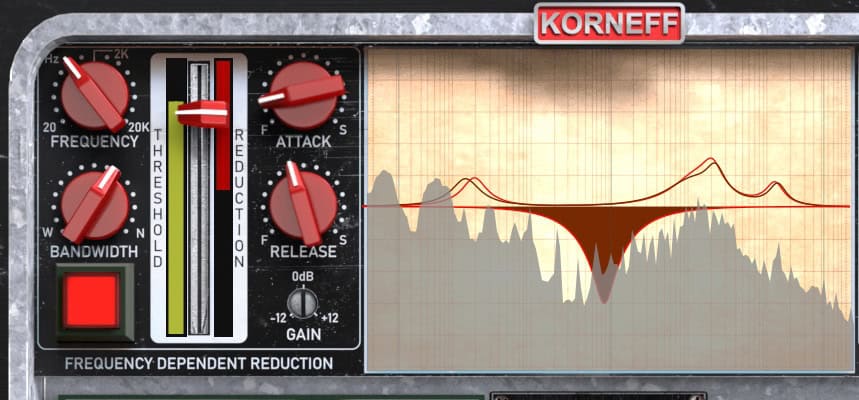
On the AIP on the Stereo Bus, go around to the back panel, and there’s a graphic display. I love the fact you can’t adjust the EQ using the display easily. You have to switch back and forth. We built it this way to force you to use your ears. But, off to the left is the FDR, Frequency Dependent Reduction. It’s a compressor that attenuates at a specific frequency. Or think of it as a parametric EQ that is triggered by a threshold. This is a really useful diagnostic tool, as well as a sound shaping tool.
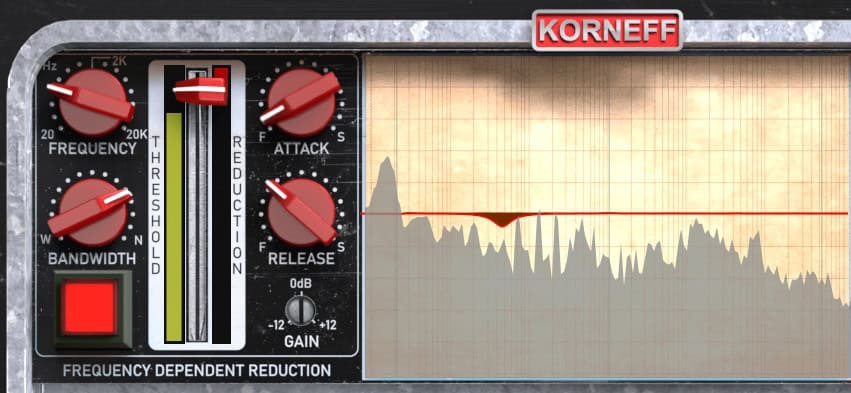
Click the big red square button to engage it. Set the ATTACK to very fast—all the way counterclockwise. Set the RELEASE to maybe 9:30 (or 130 ms), BANDWIDTH to 2, pull down that THRESHOLD FADER a little bit and play the track. Sweep the frequency around and watch the gain reduction. Can you set it so you just catch the various parts of the snare hits? How about the kick? How about the bass? With a little adjusting of the fader and the frequency, you should be able to map out where different instruments “live.” You might find things like, oh, a kick resonance that’s at 70Hz when you thought it was closer to 40Hz. You might find exactly where the ring of a snare is. Play around with this for maybe 5 minutes or a pass or two through the song. See what you can learn.
I work a lot on the Stereo Bus with the AIP and then copy it or copy the settings over once I figure out the bothersome track.
Note that ALL of this tip has been about getting rid of problems, rather than sweetening things. Do this first and you’ll have less sweetening to do, and you’ll get through your mix faster, NOT EASIER, but more SKILLFULLY and confidently.
Can you figure out why, when you make a little cut, some instruments sound louder? Let me know if you have an idea about this. And let me know if this lesson was helpful.
AND… the AIP is on FLASH SALE - 25% off until midnight on September 25th EST.