
Happy Monday!
I guess most of you know that we have a new plug-in out, released on July 4th, the 250th Anniversary of the United States of America. 250 years since July 4th, 1776. In case some of you are wondering why the new plug-in is the KA1776 Limiting Amplifier, rather than the KA1176, or some such, because at a cursory glance, it does appear to be a pair of 1176 style limiters.
You can see it here: https://korneffaudio.com/product/ka1776-limiting-amplifier/
Its introductory price is $17.76… we’re going all in on this 4th of July “Murica thing. And there’s a 25% off sale on everything else. We were going to do 250% off but the math didn’t work out favorably.
You can see there are two units in the plug-in. We did that because it gives you routing flexibility. You can run them Stereo, Dual Mono, M/S Stereo, plain old M/S, and Serial, where one feeds into the other (and this can be a stereo signal as well).
Stereo… in the case of our KA1776, Stereo means the detector circuit of the two units is listening to the same signal and the controls are linked—the settings follow each other on either unit. Dual Mono and M/S have unlinked controls, and that gives you a ton of creative freedom to process different parts of the signal individually.
Seriously, if you don’t know about running stereo signals through an M/S matrix and screwing around with the M separately from the S, you don’t know what you’re missing. Download the KA1776 demo, set it to STEREO, UNLINKED and INTERNAL and go to town. Especially play with the OUTPUT knobs!
Here’s a Thing to Listen To

Black Dog was the lead off track on Led Zeppelin IV, a classic album if there ever was one. And what a fabulous opening!
The sound at the beginning is a mix of a bunch of guitar count-ins and tape deck ramp up noises they spliced to the beginning of the tape—perhaps a nod to the beginning of Taxman on The Beatles’ Revolver album.
The riff was written by bassist John Paul Jones, and it moves across a number of time signatures, and there are times guitarist/producer Jimmy Page doesn’t quite follow it correctly, but one of the GREAT things about Page as a producer is he’s all about feel. Most of the mistakes on Steel Blimp albums work really well, which is a good thing, because there are a lot of them.
Now, that guitar sound… Page and engineer Andy Johns plugged the guitar straight into an 1176 and turned the ATTACK knob fully counterclockwise, which disables the detector circuit, effectively switching off compression and turning it into a saturator. They then plugged the output of that 1176 into another 1176, also set to ATTACK off. The result is what you’re hearing. It sounds like a tube amp, somewhat, but in a totally dry space, and with weird bottom end and a lack of any resonance.
You can get this on the KA1776. Set it to SERIAL and turn both ATTACK knobs fully counterclockwise.
Some Tech Stuff
A few of you wrote me concerning the manual for the KA1776, that it was pitched a bit high in terms of the technical explanations of the unit. I hear ya. I know this is a mixed audience ranging from highly accomplished engineers to people just starting out but wanting to really know what they’re doing.
For the next few weeks, I’m going to write on compressors. For some of you it will be dull—feel free to play in the studio with your new KA1776 from Korneff Audio hint hint. Hopefully, for a bunch of you, it will be super helpful. As I wrote last week, what is most important is that you have a clear concept of it in your head, and that concept is useful in your work.
A Basic Compressor Signal Flow
First, one thing to clear up, the word Amplifier. It can get stuck in your head as something that makes a signal louder. It isn’t just that. An amplifier is a circuit that changes the gain—the power—of a signal. Gain can go up or down. Yes, people do say things like “gain it down” and “attenuate the gain” and “negative gain,” and it all means dropping the power.
So, when something is called a Limiting Amplifier, the amplifier in this case is used to turn the gain down.
Amplifiers, whether they’re turning gain up or down, are drawn on a signal flow diagram as a triangle.
So, our compressor circuit is going to begin with an amplifier that is going to turn the gain down. We’ll call that the Gain Reduction Amplifier or the GR. Or the GR Amp, etc. I am going to use a bunch of different terms for it but they all mean the same thing. Here is our circuit so far.
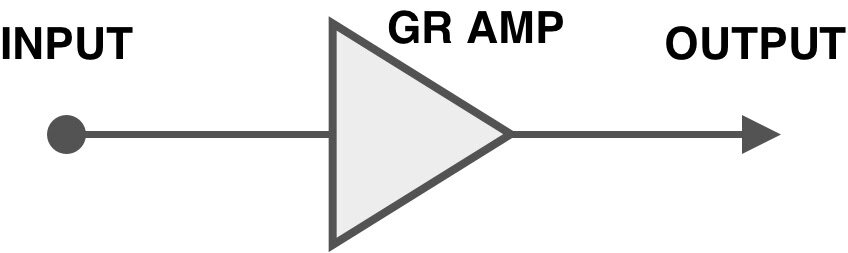
The Gain Reduction Amplifier sits there and just passes the signal through it, neither turning it up nor down. Whatever comes in is what goes out. The GR Amp sits there at Unity Gain until we tell it to turn down.
How do we get it to turn down? Well, we need to sort of attach an automatic fader to it. The same way you ride a vocal by moving the fader up and down, we need some electronics to do that. You pull the fader down when you think the signal is too loud. We need an “electronic fader” that turns down when it thinks the signal is too loud.
That circuit is the Detector. It listens to the audio, and when it thinks it’s too loud, it is going to tell the GR to turn down. We get the Detector to listen by splitting a little bit of the audio off from the main audio path through the GR, and feed that into the Detector. Think of it like a send or a patch cable. This is also called the Sidechain, because if you look at the diagram below, it is to the side of the main audio path. I might have made that up but that’s a good way to think of it. Now all we have to do is send a signal from the Detector to the GR and we’re done.
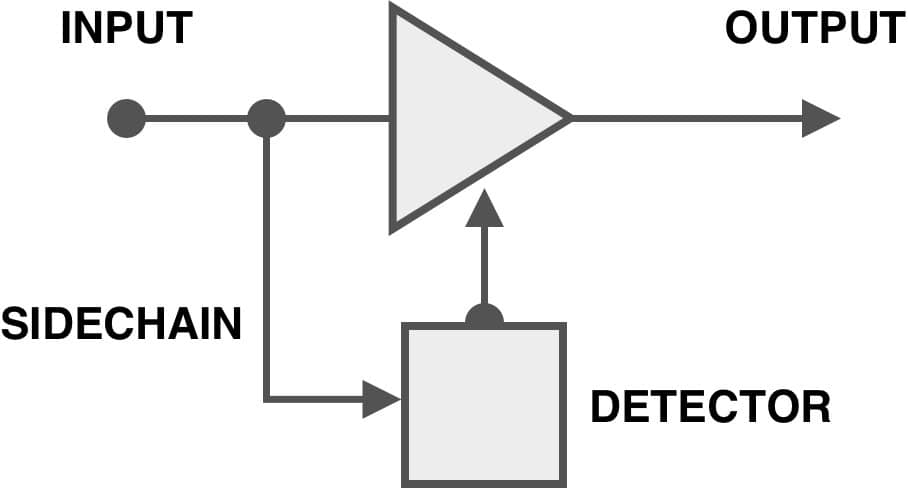
Except we haven’t given the Detector any information to help it listen to the Sidechain signal and control the Gain Reduction Amplifier.
When we’re riding a fader by hand, we have an idea as to how loud the main audio should be. If it goes louder than a certain point, we turn down. We have a line in our head that the signal crosses, and above that line, it’s too loud, we set a threshold in our head.
We need to set a Threshold in the Detector. So we add a bit of circuitry, perhaps controlled by a knob, and that sets a level. The Detector compares that Threshold Level to the level of the signal in the Sidechain. If the Sidechain is under the Threshold, the Detector doesn’t do anything. It sits there. If the Sidechain signal goes over the Threshold, the Detector sends some electricity to the GR and the amplifier turns itself down. And of course, once the Sidechain Signal falls below the Threshold, the Detector tells the Gain Reduction Amplifier to stop turning down and go back to its normal power level, also known as Unity Gain.
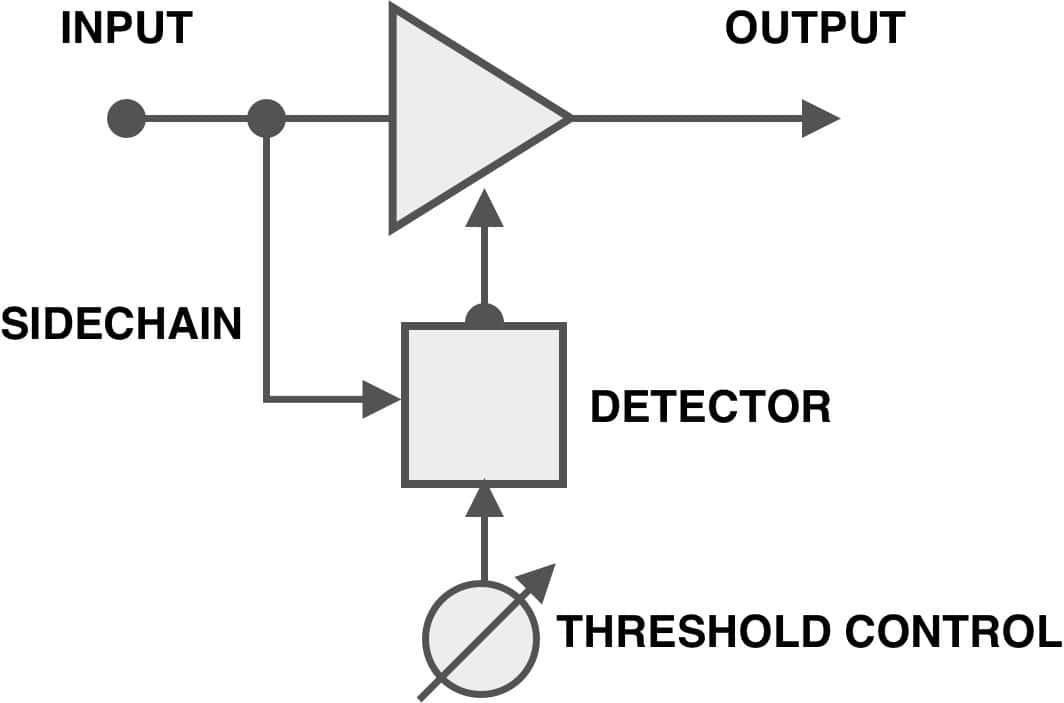
We’re going to add one more control. We have to give the Detector some idea about how much it should make the GR Amplifier turn down. Should it turn down a lot? A little? We can make it adjustable.
We’ll add a Ratio control to set how much compression happens.
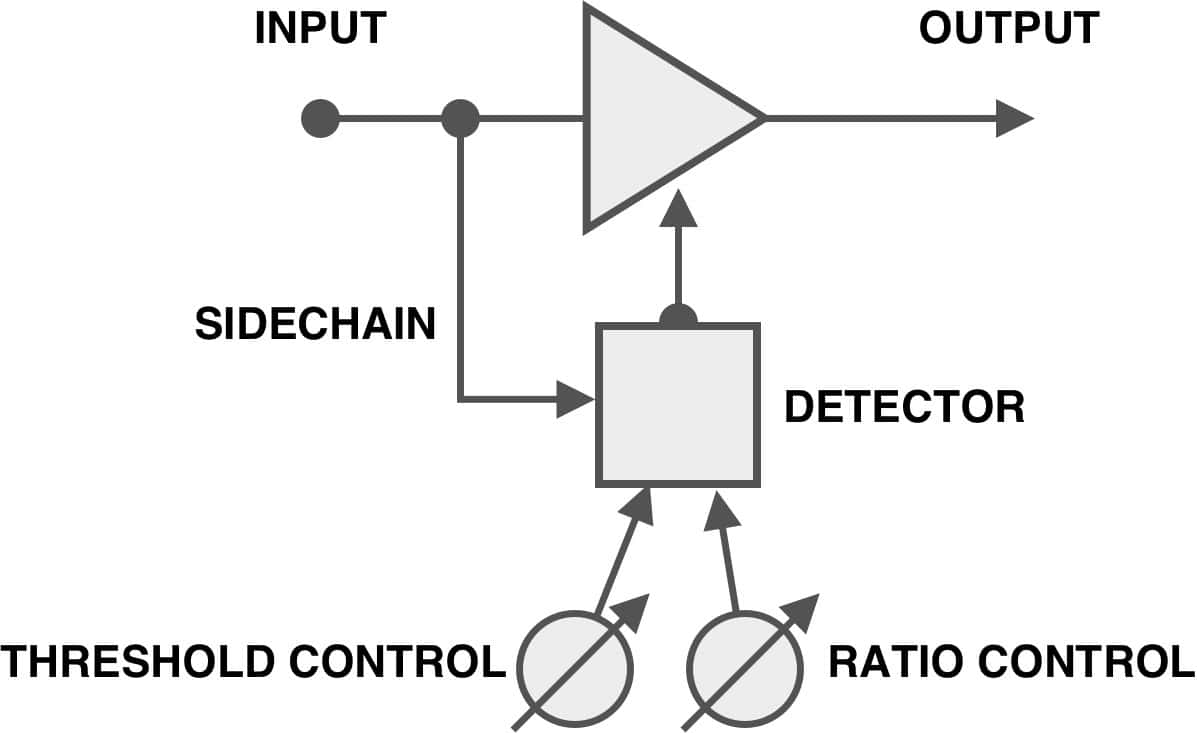
We write a ratio like this 2:1, 4:1, 100:1. Think of the two dots—the colon—as the Threshold. The first number is how many dBs go OVER the threshold, the second number is how many dBs go OUT of the GR Amplifier. Think of Ratio like a signal flow diagram.
So, at 2:1, if a signal is 4dB OVER the threshold, then only 2dB go OUT of the GR Amp. At 20:1, 4 dB over Threshold would yield an output of only 0.2dB.
At 2:1, 10dB over Threshold would have an output of 5dB. At 20:1, 10dB over would have an output of 0.5dB.
Lower ratios turn down less. Higher ratios turn down more. Really high ratios don’t let ANYTHING get over Threshold.
The Detector LISTENS. The Gain Reduction Amp TURNS DOWN.
The Detector COMPARES the Threshold to the Sidechain signal. If Sidechain goes over Threshold, Detector tells the GR Amp to turn down by an amount set by the Ratio control. When Sidechain goes below Threshold, the Detector tells the GR Amp to knock it off, and it does, recovering back to Unity Gain.
Now, just so we’re accurate, the Ratio control isn’t always part of the Detector. On the KA1776, the Ratio setting is part of the GR Amplifier, looking more like this:
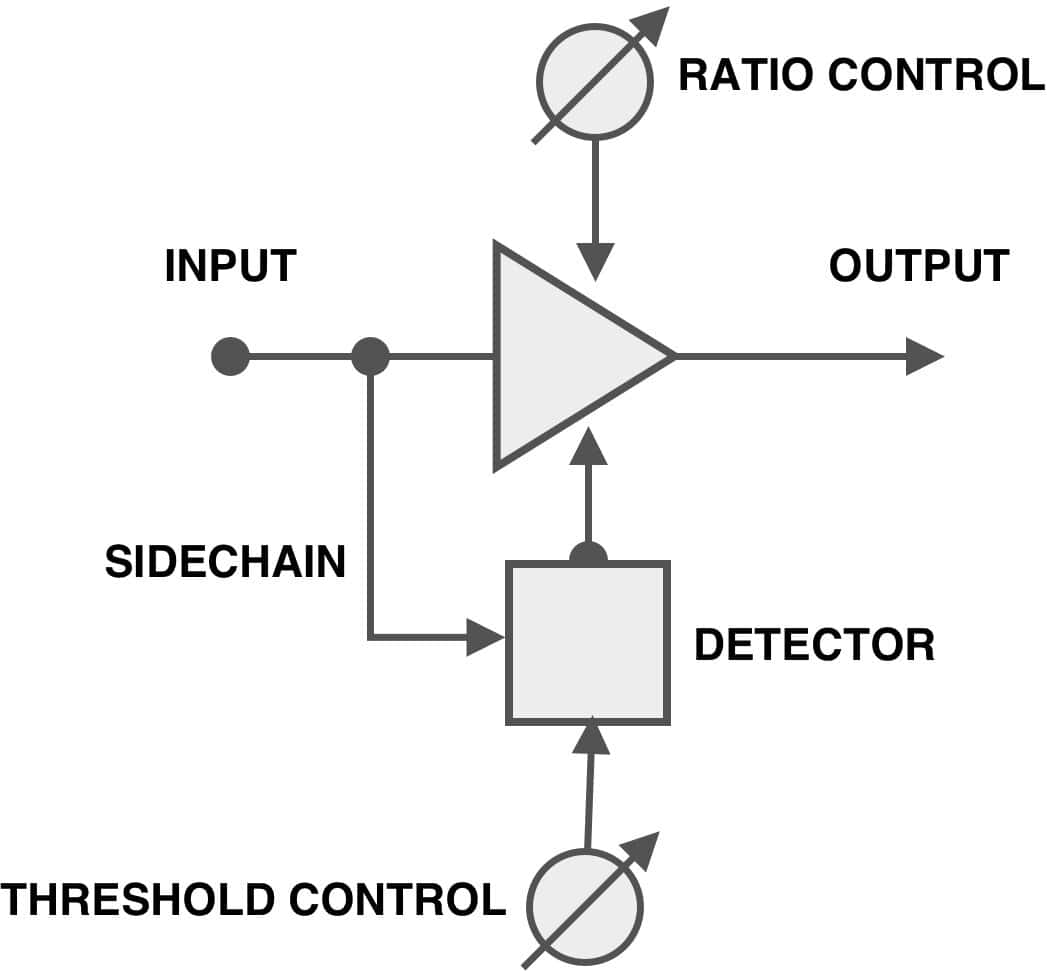
Wherever you put it, though, it works the same. And bear in mind, this is a BASIC compressor. There are a lot of different ways to compress a cat (skin a cat, compress a cat, get it?)
That is it for now. Feel free to write if you’re confused.
Try out the KA1776. It is awesome.
Warm regards,
Luke