
Korneff Tips 09: Gain and the Alpha Range
There have been a lot of comments and emails from you all about how weird the signal path is of the Sound Techniques Alpha Range Channel, and how does one gain stage with this thing blah blah blah.
It is a little weird. Most channels you’re used to have a signal flow like this:
Mic In—>Mic Preamp —> EQ—>Compressor—>Channel Fader—>Summing Amp—>Bus Fader
The Alpha Range looks like this:
Mic In—>Mic Preamp —>Channel Fader—>EQ—>EQ Amplifier—>Compressor—>Summing Amp—>Bus Fader
Do you see the critical difference? That channel fader is immediately after the mic preamp and BEFORE the EQ and Compressor. So every time you move the channel fader, the gain to the EQ and compressor changes, screwing up your levels.
The whole thing becomes a lot easier to understand if you think of the channel fader as a knob that controls the output of the preamp section and the Bus Fader as your channel fader.
Here’s a bunch of ways to set gain with this system.
Too EASY
Switch to LINE INPUT, which totally bypasses the Mic Preamp. Then click the Korneff Nameplate, and then click the AMPLIFIERS tab. Find the AUTO GAIN buttons and make sure they’re all on—they will light up green.
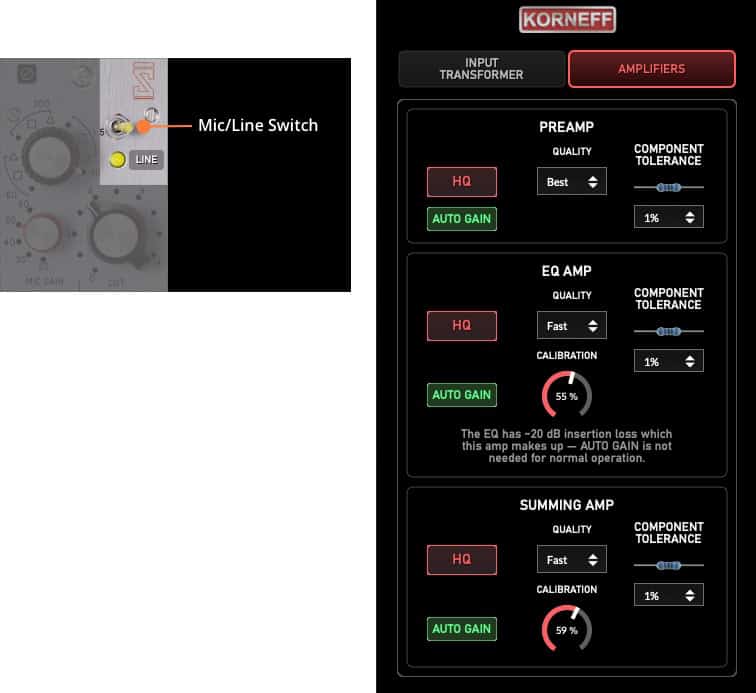
Play with the EQ and the compressor, make sure you don’t move the Channel Faders or the Bus Faders. The plugin will basically keep levels consistent. If there’s too much going out of the plugin, pull the Bus Faders down to trim the output.
The Alpha Range has Auto Makeup Gain, which means whatever changes you make to the various amplifiers doesn’t cause a gain increase out of the amplifier.
But this is also pretty boring, sonically. The Mic Preamp is the heart of the Sound Techniques magic, so we really want that most of the time.
Still EASY but cooler
Switch to MIC, and turn the INPUT TRANSFORMER IMPEDANCE to fully clockwise to the single dot. Make sure all the Auto Gains are still lit up green.
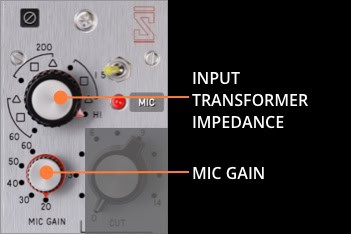
So now, you can turn the MIC GAIN up and down and add saturation to your signal, but its output is automatically lowered down by the Auto Gain. Adjust and play all ya want—just don't move the Channel Fader and gain staging remains basically a non-issue.
EASY but more to think about
Start adjusting the INPUT TRANSFORMER IMPEDANCE. There are three sections of settings, one for each impedance setting, and there are three mic pad settings within that impedance setting.
This is already getting harder, isn't it?
Each impedance setting is going to affect the frequency response of the signal feeding into the Mic Preamplifier. Click the Korneff nameplate, select the INPUT TRANSFORMER tab and look at the TRANSFORMER RESPONSE diagram. Turn the INPUT TRANSFORMER IMPEDANCE knob counterclockwise, and you'll notice the level jumps and the high end and low end change. This is modeling the effect of impedance on the signal. Practically, it's acting like a pass filter. I use this to roll off highs and sometimes the lows before using an EQ.
The Squares take 7dB off the signal, and the Triangle 14dB off the signal. The dot applies only the impedance curve with no gain reduction.
The changes in impedance and gain will affect the way the Mic Preamp distorts. Adjust Mic Gain to get the saturation you'e looking for, or rather, listening for.
Not EASY
Go to the AMPLIFIERS tab and switch off AUTO GAIN on the Preamp. Now when you change the Mic Gain, the level will go up and down with it. This is how I like to run it. I'm used to hearing the gain go up when I turn the gain up. The argument here is that anything louder sounds better and you might be fooling your ears. Yes, that is true. And it is also no fun. To me, auto gain is like having training wheels on the bike. Screw that.
So, now... as you click up the gain, it will get louder. And it is time to watch the VU meters.
The VU Meters
With Mic Gain set all the way down, and INPUT TRANSFORMER IMPEDANCE set to the lonely dot far right, watch the meters. They should be hanging around 0 VU if things were recorded correctly and you're not working with a drum track. As you turn up the MIC GAIN, the meters will rise. Use the Channel Fader to lower the output and put the meters back to around the 0 VU area.
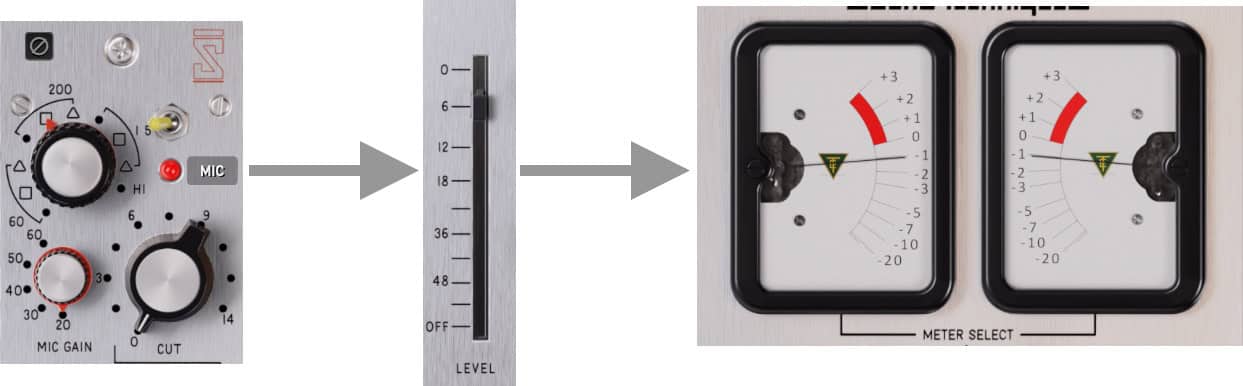
You're now kickin' it old school, my dudes.
They should basically hang around 0 VU unless you're working with a kick or a snare or some sort of percussion, in which case they should read less, like -3 to -5. This is to compensate for the meters being a bit slow to react to last transient signal. If the level is too high coming out of the EQ and Compressor, pull down the Bus Faders.
Full Naked
Switch off the AUTO GAIN on all the amplifiers. You can now overload everything accidentally, or on purpose. Adjust the output of the compressor with MAKEUP GAIN—don't switch the compressor into EZ mode.
You'll need to balance the Channel Fader, the gain knobs, the back panel amplifier tweaks, the Bus Faders—all of that. Running it like this feels about as close to using an analog channel strip as I've experienced using a plugin.
You're wondering about the EQ. That's weird too. How does one work it? Or the CALIBRATION? How does that work?
I covered a lot of this in the manual. Download the demo and play! Click the link below:
Sound Techniques Alpha Range Channel
More next week.