
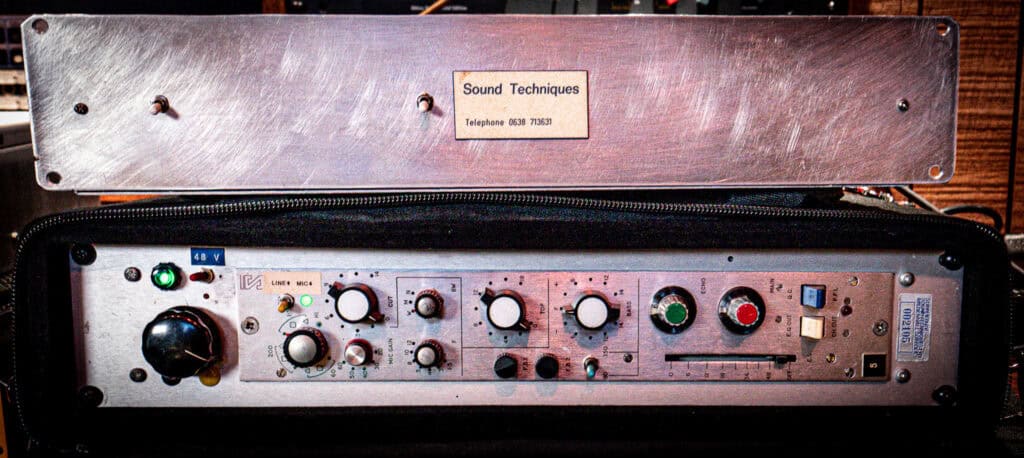
Three Amplifiers Walk Into a CPU
I tracked the song below, Acid Dreams, and mixed it in the box, using our Sound Techniques Alpha Range Channel on all 28 tracks of it. I also used a few instances of the KA1776, the Pawn Shop Comp, and the Micro Digital Reverberator, but the sound is 90% Alpha Range, and 100% Korneff Audio.
This is the sound of Sound Techniques. It's got the distinctive punch, the clean highs, the big bottom end. There's a reason why the Alpha Range winds up on every channel and the DAW becomes a virtual Sound Techniques A-Range console. You start with it on one channel, and that sounds great. So you add one to the bass, the vocals, the guitars, the guitar bus and suddenly, there are thirty instantiations of it on your mix and your CPU gives up. You get about a second of playback before it stalls. That one second sounds awesome, but the song is five minutes.
How do we keep the sound but lighten up on the CPU?
Our plugins that modeled from historic hardware don't use saturation algorithms or wave shapers to simulate the sound. We model the exact circuit down to the smallest component. The Sound Techniques channel has three separate discrete transistor amplifier circuits and a passive inductor EQ network, all of them solved as actual circuits, sample by sample, at whatever the sample rate of your session. That is a TON of math. Each circuit has a cost your CPU pays. Every one of them also has switching to move it completely out of the signal path, which bypasses that particular code branch. The CPU doesn't pay the cost of code that doesn't run.
The trick, then, is to only pay for the amplifiers you're actually using. This is how I do it. I'm going to break down what each switch does, what each switch saves in CPU, and how you can get your mixes to run with Alpha Ranges all over it.
1) Not driving the preamp? Switch to LINE.
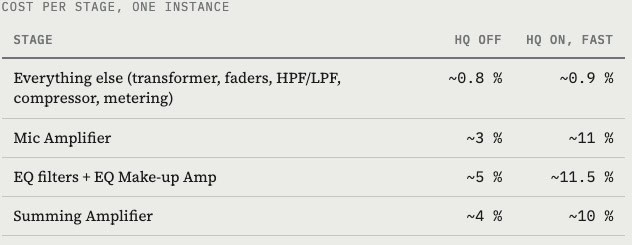
Mic Amplifier — This is the heart of the Sound Techniques sound, where most of the saturation lives. Flip MIC/LINE to LINE to bypass the Mic Preamplifier if you don't need the preamp saturation. For something that is already very saturated or distorted, like heavy guitars, flip it to line and save some CPU.
Mic Preamp CPU COST
HQ On: 11%
HQ Off: 3%
2) Only here for saturation? Cut the EQ.
EQ Make-up Amplifier — This is after the EQ network, which is passive and has a gain loss. The Make-up amp brings it back up. EQ CUT removes the EQ and the make-up gain amplifier from the signal path. There is a big savings depending on if you're not using the EQ, cut it.
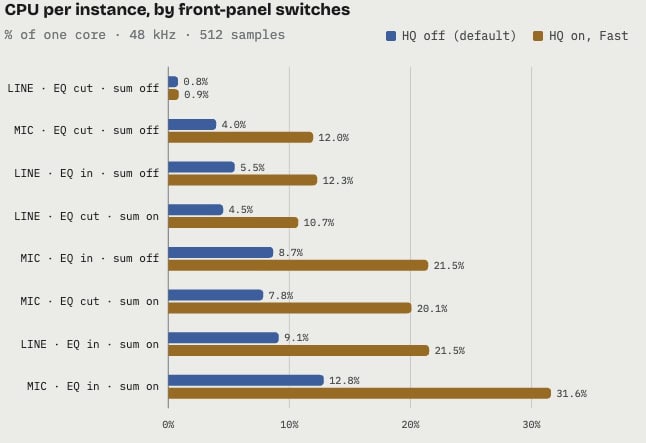
The EQ filter network is also a circuit model that needs to be solved, so EQ CUT removes it AND the amp, for one of the biggest CPU savings on the plugin: 5% per channel with HQ off, 11.5% with HQ on.
An EQ set to 0, no boost or cut on any band, is still a full circuit simulation. I can't stress enough, if you're not using the EQ, cut it. On a big mix, the savings could add up to a whole processor core.
Also, with the channels unlinked, both strips have to be on LINE before the amp actually stops running, because the model is stereo. Linked, switching one to line switches both.
The HPF and LPF are not part of this, however. They're cheap and they stay in the path when you cut the EQ. Use them all you want.
EQ CPU COST
HQ On: 11.5%
HQ Off: 5%
3) Only turn on the Summing Amp when you need it
Summing Amplifier — This is the console's stereo bus amplifier. It adds another layer of transformers and saturation. It sounds great, especially on drums and bass, but if you're not hearing a difference between switched in or out, switch it out by flipping the SUMMING AMP toggle in the center section to OFF. This pulls it, and all its code, out of the picture. This is its default position, by the way.
My trick is to keep the Summing Amp off when the Alpha Range is on channels, but insert it on the Stereo Bus, or on a drum bus, with it set to LINE, EQ cut, with the SUMMING AMP on. This mimics the flow of the actual console, and it adds an overall Sound Techniques magic to any channels in your mix without an Alpha Range on them, should that actually happen.
So, make your DAW into a virtual A-Range console and save CPU cost. One Summing Bus instance is 4.5% without HQ, 10.7% in HQ. It's much cheaper to run just one at the end of things.
Summing Amp CPU COST
HQ On: 10.7%
HQ Off: 4.5%
Real World Measurements
I measured the compiled DSP core directly—just the audio code with no GUI, or DAW, at 48 kHz with 512-sample buffers on one core of an AMD Threadripper PRO 3955WX, feeding it a music-like signal peaking at -18 dBFS.
"CPU" below means the share of one core's real-time budget a single instance of the Alpha Range eats. Your machine will have different absolute numbers, but the ratios between settings are baked into the circuit math and will be true on any machine.
These measurements are based on the default rear-panel settings: HQ off on all three amps, oversampling off. The HQ rows shows the same switches with all three HQ buttons on at Fast quality. Values are averages across 5 sec of audio, best of three passes.
CPU cost per instance, using front panel switching
The rear panel: HQ, Quality, Oversampling
On the rear panel, the adjustments of HQ and Oversampling let you further the savings, or purposefully spend to achieve the sound you want.
HQ switches each amp to the full non-linear Newton-Raphson model, with about three times the cost per amp when HQ is set to Fast. The burden goes up on Normal and even more on Best.
HQ is switchable per amplifier, so you can run the preamp in HQ and leave the EQ amp and Summing Amp in standard mode, or use various Fast, Normal, Best settings per channel. Be prepared to bounce that channel, though.
Cost per stage, one plugin instance, HQ off vs. HQ fast
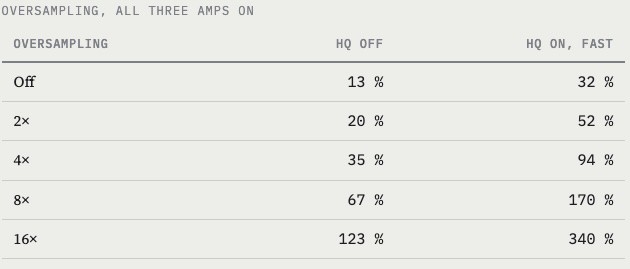
OVERSAMPLING temporarily raises the plugin's internal sample rate before processing the signal. This moves aliasing artifacts above the audible range of hearing. For non-linear things like saturation or distortion, this might be a lifesaver, but in terms of CPU, it really expensive. It scales almost exactly with the factor, and it's where the really big CPU hit happens. The higher the oversample rate, the bigger the hit. If you're doing 16x oversampling, you'll need to bounce/print.
The CPU cost of Oversampling
The choice of linear-phase or minimum-phase filter makes no measurable difference to CPU, only to latency, so pick that one by ear.
Other considerations
CHANNEL CUT doesn't save CPU. The channel-cut position on the EQ switch crossfades to a dry pass-through so you can A/B click-free, but the whole chain keeps running underneath. If you want to really pop the channel out to save CPU, use your DAW's bypass, or flip LINE + EQ CUT.
Mic gain 60 costs a little more. The five gain positions are five different amplifier operating points, but the top one actually reroutes the circuit a bit to better simulate the actual hardware, and this makes the solver work about 20% harder than the 20–50 settings.
Sample rate is a straight multiplier. At 96 kHz every number above roughly doubles (we measured 2.1×), because the circuits are solved per sample. If you're tracking at 96k, every switch counts for a lot.
Putting it together: a sane session
Here are guidelines I follow. This was central to my mixing technique on the song at the start of this post, and it's the methodology I evolved across the months of developing and working with the Alpha Range.
Every track: MIC where you want saturation, LINE where you don't. EQ in only where you're actually using it. Summing amp off. HQ off, or HQ on just the preamp for the sources most exposed in the mix or that really carry the record. At these settings, a channel costs 4 to 9% of a core, so a 16-core machine will run a very large console before it breaks.
Mix bus: one instance, switched to LINE, EQ cut, compressor to taste, SUMMING AMP on, HQ on, Normal quality. This uses about 11% of one core. Inexpensive and you get that Sound Techniques gloss across everything.
Printing: when the mix is set to bounce, switch HQ to Best and oversampling to 4× or more on the bus instance and on the channels that matter, and then bounce offline.
Not everything needs the highest quality all the time. As it says in the manual, you don't need the most realistic tambourine ever recorded. Keep your channels lean unless it's making a difference.
If you have questions, you can find us on Facebook, Discord, and of course, hit us up using Contact on the website.
Thanks for reading and I hope you're having fun with your Alpha Range.
Cheers,
Dan Korneff
Measurements: compiled Alpha Range Channel DSP core, 48 kHz, 512-sample buffers, -18 dBFS peak music-like test signal, single core, AMD Ryzen Threadripper PRO 3955WX. Figures are averages over 5 seconds of audio, best of two or three passes. Absolute percentages will differ on your machine; ratios between settings will not.